Omnia
  • Admin settings
  • Blocks
    • Anchor navigation
    • Action button
    • Activity feed
    • Announcements
    • Authentication block
    • Banner
    • Blocks for analytics
    • Blocks for Event management
    • Blocks for Forms
    • Blocks for pages
    • Blocks for processes
    • Breadcrumb
    • Calendar rollup
    • Channel rollup
    • Controlled documents library block
    • Copilot chat
    • Create app block
    • Community rollup block
    • Current navigation
    • Document rollup
    • FAQ block
    • General block settings
    • HTML/script
    • IFrame block
    • List rollup
    • Media
    • Media rollup
    • Mega menu
    • Notification panel
    • Using the Omnia block web part
    • Organization tree block
    • Posts block
    • People rollup
    • Power app block
    • Properties block
    • Publishing app rollup block
    • Profile completion (classic)
    • QR code
    • Quick links
    • Rating
    • Related links
    • RSS reader
    • Search
    • Sign-off requests rollup
    • Table of contents block
    • Task rollup
    • Taxonomy navigation
    • Teamwork rollup
    • Team news rollup
    • Teams channel feed
    • Text
    • User information
    • User profile progress
    • Welcome block
    • Working with blocks on pages
    • Viva Engage
  • General assets and options
  • Pages and page navigation
  • Working with documents
  • Working with processes
  • Working with events
  • Using communities
  • Using newsletters
  • Using Omnia Feed
  • User options
  • Roles and permissions in Omnia
  • Setup
  • Accessibility
  • Switch to site selected
  • About SharePoint CSP enforcement compatibility
  • SharePoint Server 2019 – End of Support and Omnia Testing Policy Update
  • Cookies consent information
  • MCP client integration
  • Release notes
  • In Development
  • Contribute to this documentation
Omnia
  • Blocks
  • Breadcrumb
  • View page source

Breadcrumb

The breadcrumb block makes it possible for end user to navigate to any parent node of the current page in the navigation structure.

For physical pages, that is not part of the navigation structure (for example news articles), it will show the welcome page of the current publishing sites as the parent node.

../../_images/breadcrumb-new.png

Settings for the block

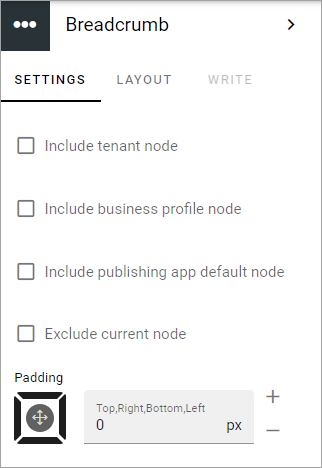
The following settings are available for the Breadcrumb block:
../../_images/breadcrumb-settings-v75.png
  • Include tenant node: Select this option to always display the tenant Node. The text for this is set in Omnia admin, in the Title field under Tenant-Settings-General.

  • Include business profile node: Select this option to always display the business profile node. The text for this is the name for the business profile as set in Omnia admin, Tenant-Business profiles.

  • Include publishing spp default node: This is especially useful if there are several page collections in a publishing app, and you want to show that they belong together. The title of the publishing app is set when it’s created and can later be edited in OmniaaAdmin under Publishing for the business profile.

  • Exclude current node: To not show the current node in the breadcrum, select this option.

For more information about the tenant title, see: Settings (Tenant)

For more information about the business profile title, see: Business profiles

For more information about how to change a publishing app’s title, see: Publishing

Layout and Write

The WRITE TAB is not used here. The LAYOUT tab contains general settings, see: General Block Settings

Previous Next

© Copyright 2026, Omnia Digital Workplace AB. Last updated on Jun 22, 2026.

Built with Sphinx using a theme provided by Read the Docs.