Permissions for variation pages
A variation page is a copy of a source page that contain some sort of alternative content. It can for example be the source text in another language, but variations can really be used for a lot of purposes.
As a variation is a page, normal permissions for pages within a page collection apply. Colleagues that are permitted to edit the source page, can edit the variations of that page as well, if no specific permissions are set up. Page collection administrators can always edit all pages in a page collection, variation pages included, regardless if how other permissions are set up.
If a variation page is created by machine translation, it can’t be edited by anyone. This is an exception to the rule above.
Variation specific permissions
In Omnia 7.9 and later, you can set variation specific permissions if needed, using the navigation view.
You can set permissions for all variation pages of a certain type in the page collection, this way:
Open a page for editing.
Select the variation you would like to set permissions for.
Select permissions for the page collection.
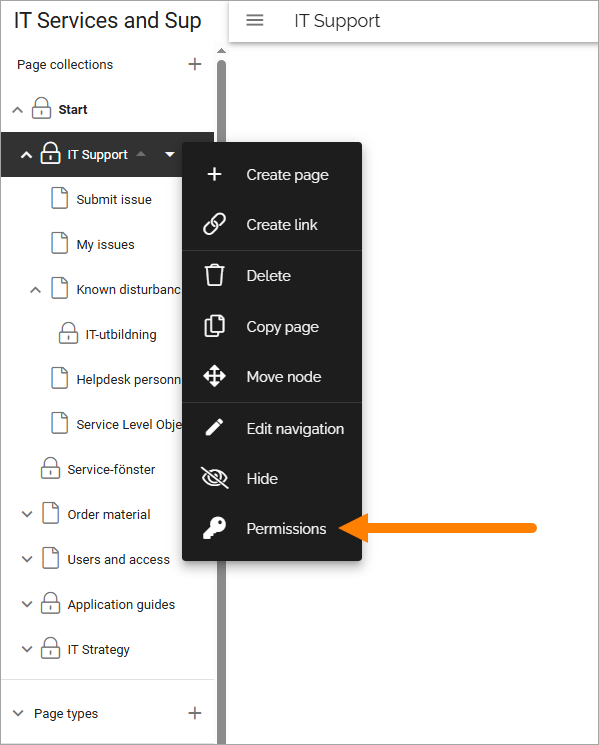
Select “Enable variation specific permissions”.
Set permissions for editor and/or author for the variation.

Save.
Note that the variation you set permissions for is shown, in this example “Svenska”.
Permission for a specific variation page
If needed, you can set permissions for a specific variation page. Here’s an example of a case where that could be needed: The page collection is an employee handbook and two colleagues in Sweden are responsible for the handbook, but there is a variation in Denmark for the page regarding holidays. A local Danish colleague is appointed responsible for the Danish variation of the holidays page only. He or she should not be able to edit any other pages in the page collection.
This is how it’s set up:
Open the page for editing.
Select the variation you would like to set permissions for.
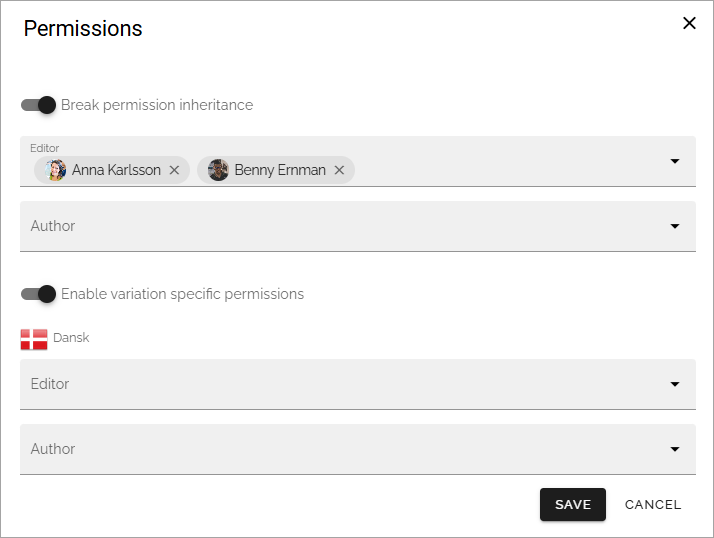
Break inheritance.
Select “Enable variation specific permissions”.
Add editor and/or author permissions for the variation.
Save.
Now the variation of this page, Dansk in this example, can only be edited by the colleauge(s) you have selected.