Omnia
  • Admin settings
  • Blocks
  • General assets and options
  • Pages and page navigation
    • Accessibility check when editing pages
    • Approve pages
    • Automatic page creation
    • Check page feedback
    • Check version history and use an earlier version
    • Copy a page
    • Create a page
    • Create label (Navigation tree)
    • Create link (Navigation tree)
    • Delete a page
    • Edit a page
    • Edit navigation
    • Edit page variations
    • Permissions to edit a page
    • Hide one or more pages
    • Invite co-authors
    • Language versions of a page
    • Move one or more pages
    • Page collections
    • Page statistics
    • Page types
    • Permissions for variation pages
    • Print a page
    • Publish page changes
    • Publishing app settings
    • Reports
    • Reusable content
    • Send page as Email
  • Working with documents
  • Working with processes
  • Working with events
  • Using communities
  • Using newsletters
  • Using Omnia Feed
  • User options
  • Roles and permissions in Omnia
  • Setup
  • Accessibility
  • Switch to site selected
  • About SharePoint CSP enforcement compatibility
  • SharePoint Server 2019 – End of Support and Omnia Testing Policy Update
  • Cookies consent information
  • MCP client integration
  • Release notes
  • In Development
  • Contribute to this documentation
Omnia
  • Pages and page navigation
  • Create link (Navigation tree)
  • View page source

Create link (Navigation tree)

Using the option “Create link”, available in Omnia 7.10 and later, you can add a link to the navigation, to anything you can reach with a custom link, a page or a document. All link nodes can be moved and deleted, and sub pages and more can be added, the same way as for a page. Deleting/archiving works the same as for pages as well.

  1. Select the page or heading the link will be placed under.

  2. Open the menu and select “Create link”.
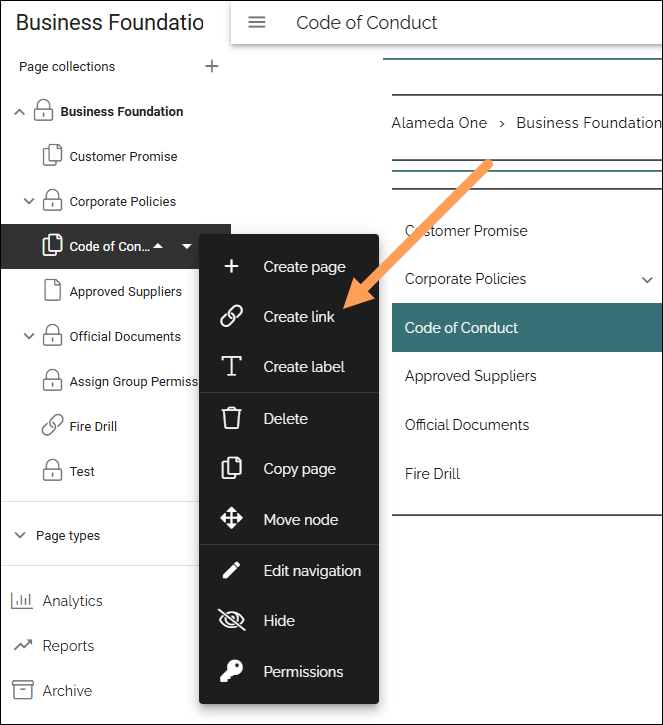
../../_images/navigation-add-link-711.png

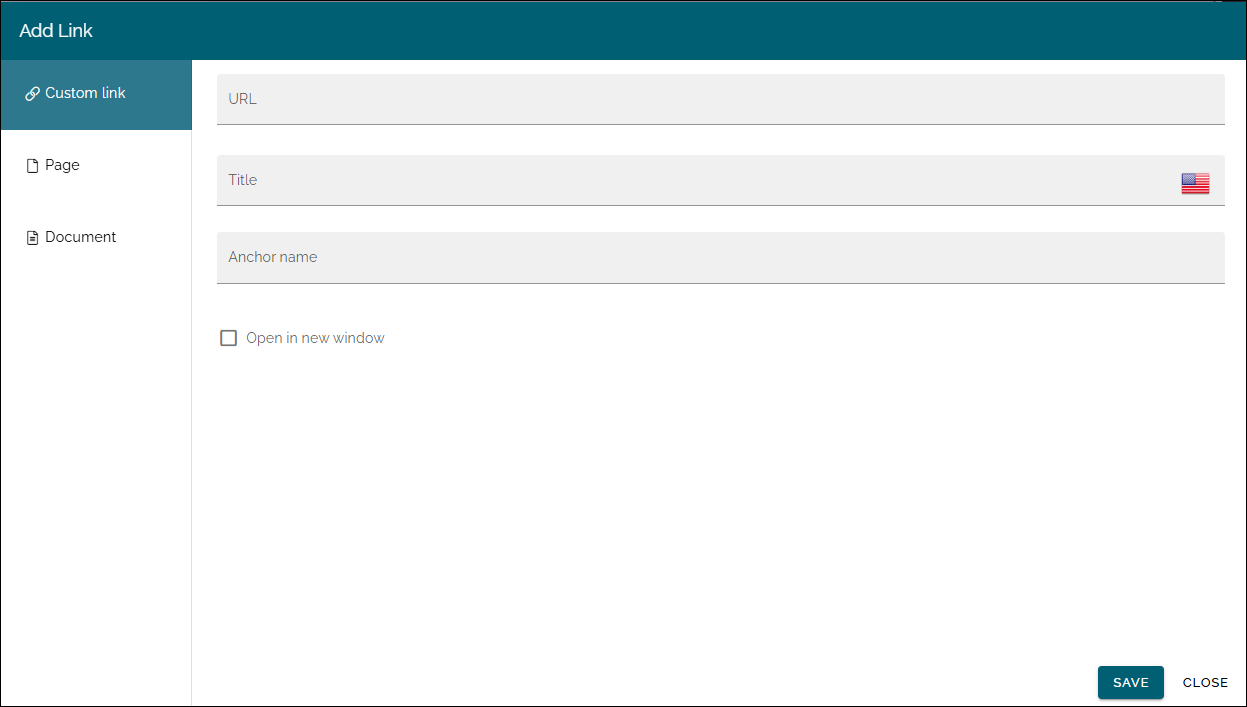
The Add link general asset is opened and you use it to create the link.
../../_images/add-link-asset-711.png

See this page for more information (but note that you can only create a Custom link here): Add link

Previous Next

© Copyright 2026, Omnia Digital Workplace AB. Last updated on Jun 22, 2026.

Built with Sphinx using a theme provided by Read the Docs.