Omnia
  • Admin settings
    • Tenant Settings
    • Business profile settings
      • Announcements
      • Communities settings
      • Features (Business Profile)
      • Forms
      • Notification panel
      • Omnia Feed - Business profile settings
      • Permissions for a business Profile
      • Publishing settings
      • Search
      • Settings
      • Shared links
      • Teamwork settings
      • User Management - business profile
      • Workspace
    • App settings
  • Blocks
  • General assets and options
  • Pages and page navigation
  • Working with documents
  • Working with processes
  • Working with events
  • Using communities
  • Using newsletters
  • Using Omnia Feed
  • User options
  • Roles and permissions in Omnia
  • Setup
  • Accessibility
  • Switch to site selected
  • About SharePoint CSP enforcement compatibility
  • SharePoint Server 2019 – End of Support and Omnia Testing Policy Update
  • Cookies consent information
  • MCP client integration
  • Release notes
  • In Development
  • Contribute to this documentation
Omnia
  • Admin settings
  • Business profile settings
  • Shared links
  • View page source

Shared links

Using shared links a business profile administrator (or any other users added to the separate permissions list) can create business profile specific links that users can access through “My links”.

Some links can be mandatory and it’s also possible to target links to certain colleagues or groups.

These links can also be accessed through a Quick links block on any page, see: The Quick links block

A list of shared links for the business profile can look like this:
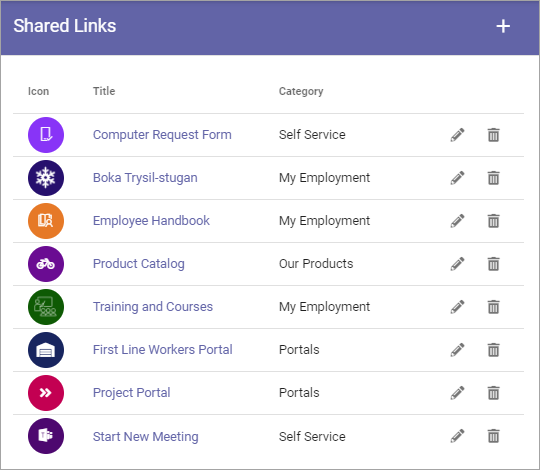
../../../_images/business-profile-shared-links-list.png

Options for tenant shared links and business profile shared links are identical. For information on how to create and edit shared links, see: Shared links (Tenant)

Permissions

Permissions settings for working with shared links are found here: Permissions for a business profile

Note that business profile administrators always can work with shared links.

Previous Next

© Copyright 2026, Omnia Digital Workplace AB. Last updated on Jun 22, 2026.

Built with Sphinx using a theme provided by Read the Docs.