Omnia Feed implementation example
In this example:

“Feed” is a Query (Rollup) containing corporate news and local news, with sign-off request applicable for the user, also shown.
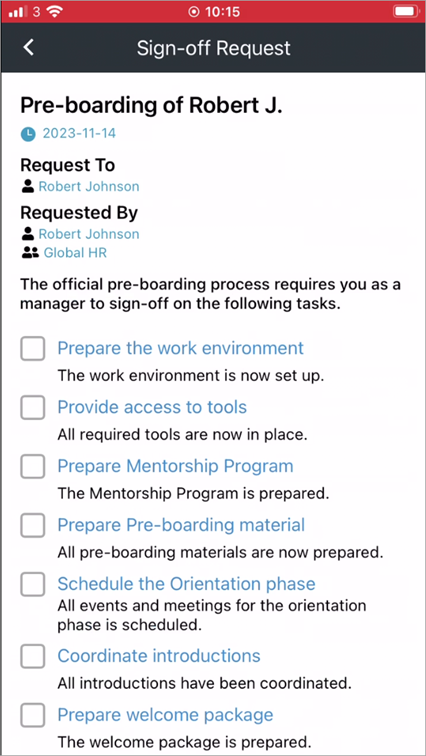
At the top there are a number of Sign-off requests that needs the user’s attention. Here’s an example with the actions needed for one of the sign-off requests:
When reading news, users can see likes and comments for each News Article.

A user can like a news article by selecting the hearth. To add a comment, the user scrolls down to the end of the article.

In this implementation example, there’s also a link to the start page of the Omnia Intranet. It’s set up as an embedded link.

The third icon from the left, called “Apps” displays a number of useful resources on the intranet. It’s setup as an embedded link, linking to a page on the intranet, containing a “Quick Links” block.

The next icon displays some polls for the user:

It’s setup with an embedded link, linking to a page using “Form” blocks to display the polls.
The “Create” icon makes it possible for the user to create news, an alert, a poll or a praise, if the user has the right permissions.

It’s setup with an embedded link to a page with an “Action button” block at the top and a “Page Rollup” block under the action buttons.
There’s also a number of settings for the user, that’s default fo all setups.
